Queuing in the API
When queuing is triggered, customers must join a queue and wait for their turn before they can add tickets to a basket. This document explains how to detect when queuing is in effect, how to join the queue, and how to handle possible responses for user flows that are built to use web mode API to add tickets to the basket.
Queuing only applies in Web mode. System Owner API calls are not affected.
Affected Endpoints
The following ticket basket endpoints will enforce queue checks when queuing is triggered on a system:
| Method | Endpoint | Description |
|---|---|---|
POST | api/v3/basket/tickets | Add tickets to the current basket |
PUT | api/v3/basket/tickets | Replace all tickets in the current basket |
POST | api/v3/basket/tickets/best-available | Add best-available tickets to the current basket |
If your integration is using any of the above endpoints, it must be able to handle error messages and prompts to join the queue.
{
  "eventInstanceId": "12345ABCDE",
  "joinQueue": "/api/v3/basket/queue/12345ABCDE",
  "message": "You must join the queue.",
  "code": "JoinQueue"
}
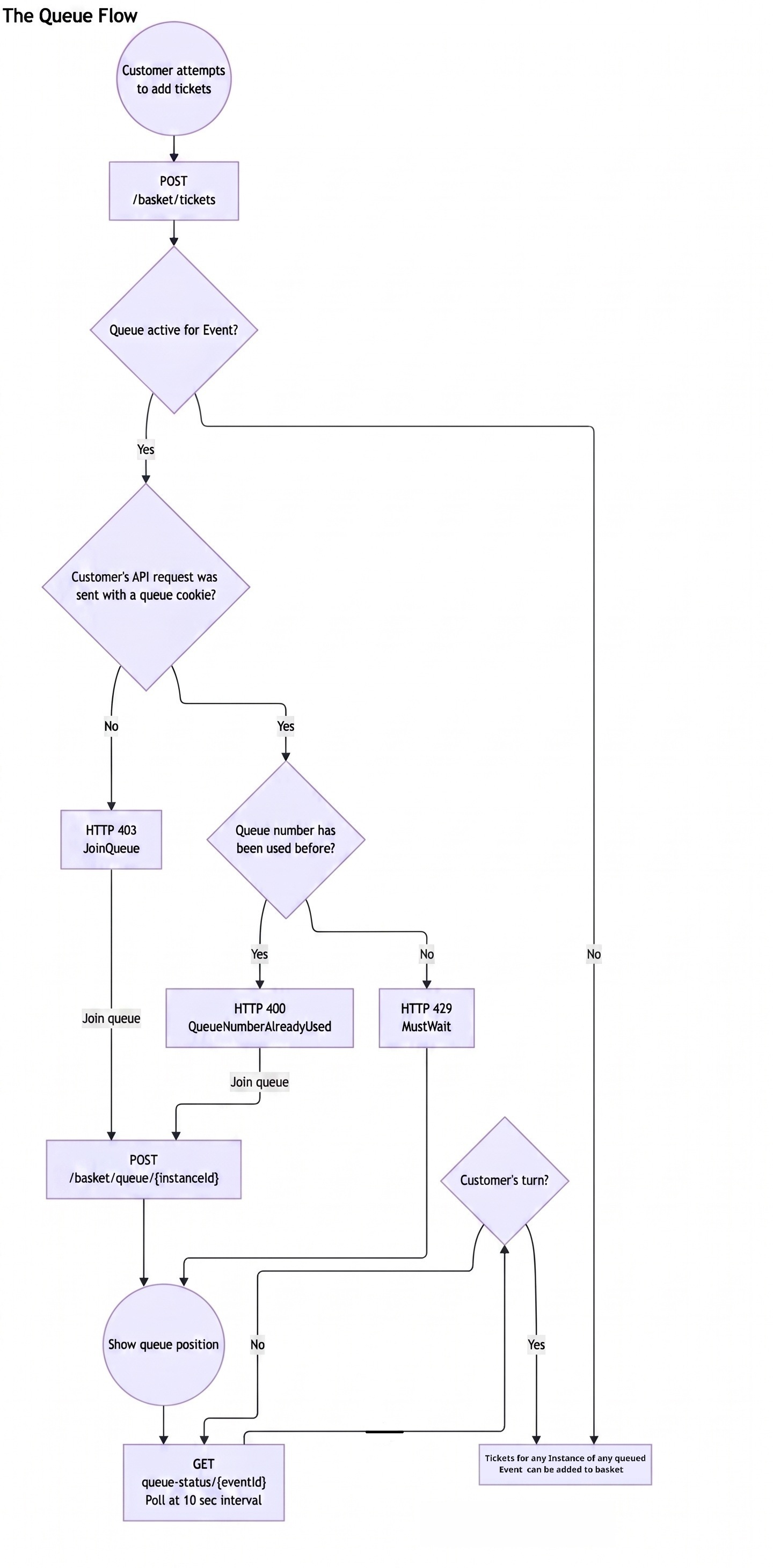
See in detail below for flow and additional error messages that may appear.
When queuing is not triggered, no queue handling is required, so tickets will be added to the basket as per usual.
The Queue Flow
Joining the Queue
When a customer must join a queue, redirect or prompt them to join.
Request
POST api/v3/basket/queue/{eventInstanceId}
| Parameter | Description |
|---|---|
eventInstanceId | The API ID of the event instance the customer wants to attend |
Response
{
  "queueNumber": 1542,
  "headOfQueue": 1389,
  "status": "MustWait"
}
| Field | Description |
|---|---|
queueNumber | The customer's position in the queue |
headOfQueue | The queue number currently being served |
status | MustWait — customer is in the queue but must wait; CanProceed — customer can add tickets immediately |
When a customer joins the queue, a QueueNumber cookie is set automatically by the server. This cookie is HttpOnly and Secure. Your integration must ensure cookies are preserved across requests in the same session — standard browser-based integrations handle this automatically.
After joining, if status is MustWait, GET /api/queue-status/{eventId} every 10 seconds to track the customer's position. This endpoint accepts both the numeric event ID (e.g. 3821) and the API-format event ID (e.g. 3821AQHDBDQSDDTVTGMMVRMSSSKTGKB). Once headOfQueue reaches or exceeds the customer's queueNumber, retry the ticket request to add tickets to the basket. (see Handling 429 MustWait below).
Polling Queue Position
While waiting, use the queue status endpoint to check whether the customer has reached the front.
Request
GET api/queue-status/{eventId}
| Parameter | Description |
|---|---|
eventId | The event ID - accepts both the numeric event ID (e.g. 3821) and the API-format event ID (e.g. 3821AQHDBDQSDDTVTGMMVRMSSSKTGKB) |
Response
{
  "headOfQueue": 1489,
  "queueingEnabled": true,
  "estimatedRatePerMinute": null,
  "wikiTextHtml": "<p>Please wait, you will be served shortly.</p>"
}
| Field | Description |
|---|---|
headOfQueue | The queue number currently being served |
queueingEnabled | Whether queuing is still active for this event |
estimatedRatePerMinute | Estimated throughout (nullable — may not be enabled) |
wikiTextHtml | HTML content configured in Spektrix Admin under Queueing settings. Display this on your waiting page to show custom messaging from the venue. |
How to use:
- Poll every 10 seconds.
- Compare headOfQueue to the customer's queueNumber (from the join response).
- When headOfQueue >= queueNumber, the customer can proceed — retry the ticket request.
- If queueingEnabled becomes false, queuing has been turned off — proceed immediately.
- Display the wikiTextHtml content on your queue waiting page to show venue-configured messaging to the customer.
Why use this endpoint?
- It's lightweight — no basket or session overhead.
- It provides wikiTextHtml content you can display on your own custom waiting page.
- It avoids unnecessary 429 responses on the ticket endpoints.
Error Reference
Summary Table
| HTTP Status | Code | When it occurs | Action |
|---|---|---|---|
400 | QueueNumberAlreadyUsed | Queue number already used on a completed order | Ask customer to rejoin the queue |
400 | ExistingBasket | Customer has an open basket to complete | Ask customer to check out or cancel existing basket |
400 | CanNotJoinMultipleQueues | Tried to queue for multiple events at once | Ask customer to complete or leave their current queue |
403 | JoinQueue | No queue cookie — customer hasn't joined | Call POST /basket/queue/{id}, show position |
429 | QueuePositionNotReached | In queue but not at the front yet | Show position, retry after Retry-After seconds |
400 — Queue Number Already Used
The customer's queue number has already been used to complete a transaction. This typically means they completed a purchase in another tab or session.
{
  "message": "This queue number has already been used.",
  "code": "QueueNumberAlreadyUsed"
}
How to handle:
- Inform the customer that their queue number is no longer valid.
- If they wish to purchase again, they must rejoin the queue from the beginning.
400 — Existing Basket Requires Checkout
The customer already has items in a basket from a previous session that must be completed or cancelled before they can join a new queue.
{
  "message": "You have an existing basket that must be checked out or cancelled before joining the queue.",
  "code": "ExistingBasket"
}
How to handle:
- Prompt the customer to complete or abandon their existing basket before proceeding.
- This can be returned both when adding tickets and when joining the queue.
400 — Cannot Join Multiple Queues
The customer is attempting to add tickets for events across more than one queue simultaneously. A customer may only be in one queue at a time.
{
  "message": "You may not join multiple queues at the same time.",
  "code": "CanNotJoinMultipleQueues"
}
How to handle:
- Inform the customer they are already in a queue for a different event.
- They must complete or abandon their current queue before joining another.
403 — Must Join Queue
The customer has not yet joined the queue for this event. This will be returned when they first try to add tickets and queuing is active.
{
  "eventInstanceId": "12345ABCDE",
  "joinQueue": "/api/v3/basket/queue/12345ABCDE",
  "message": "You must join the queue.",
  "code": "JoinQueue"
}
How to handle:
- Direct the customer to join the queue.
- Call
POST api/v3/basket/queue/{eventInstanceId}to issue them a queue number. - Show their position and ask them to wait if
statusisMustWait. - Once they reach the front, retry adding tickets.
429 Must Wait
The customer has a valid queue number but has not yet reached the head of the queue.
{
  "eventInstanceId": "ABCDE12345",
  "queueNumber": 1542,
  "headOfQueue": 1389,
  "message": "You have not reached the head of the queue. Please wait until your number is reached before proceeding.",
  "code": "QueuePositionNotReached"
}
| Field | Description |
|---|---|
queueNumber | The customer's queue number |
headOfQueue | The number currently being served |
How to handle:
- Display the customer's position to them (e.g. "You are number 1542, currently serving 1389").
- Poll GET
/api/queue-status/{eventId}every 10 seconds to track position. This endpoint accepts both numeric and API-format event IDs. WhenheadOfQueuereaches the customer'squeueNumber, retry the ticket request. - Do not call POST
/basket/queue/{instanceId}again — the customer already has a queue number and calling join again is not necessary.
While retrying the ticket endpoint directly will also work (returning 429 with position info until the customer reaches the front), we recommend using queue-status for polling as it is lighter-weight and provides the configured Queueing WikiText HTML for display on your waiting page.