Authentication and Setup
A Spektrix Connect integration uses two separate sets of credentials, one for each side of the connector.
| Who uses it | Where it's stored | Used for | |
|---|---|---|---|
| ① Connector credential | Spektrix, to call your connector | Entered by the Spektrix client in Spektrix Settings | Proving to your connector that the request comes from that Spektrix client |
| ② Agency API credentials | Your connector, to call the source system | Stored in your connector's own secure configuration | Proving to the source system that your connector is an authorised agent |
The two are deliberately independent. Spektrix never sees the source system's credentials, and the source system never sees the credential Spektrix sends to your connector.
① Connector credential: Spektrix to your connector
Your connector decides how Spektrix should authenticate. You choose the name of an HTTP header, such as X-Api-Key, and issue a secret value for it. Spektrix sends this header, unchanged, on every request to your connector:
GET https://connector.example.com/v1/instances?startFrom=2026-03-01T00%3A00%3A00 HTTP/1.1
X-Api-Key: 4f1c9e0b-2d7a-4b5e-9a63-0c8e1f2d3b4a
Your connector must:
- Check the header on every request, and reject any request where it's missing or wrong with
401 Unauthorized. - Issue a separate value for each Spektrix client. If you serve more than one Spektrix client, the header value tells you which one is calling, so you can use the matching source system credentials.
- Treat the value as a secret, and let it be rotated. To rotate it, the Spektrix client updates the value in Settings.
Configuring the connector in Spektrix
The Spektrix client adds your connector as a new source system in the Spektrix Settings interface, choosing the HTTP Connector type:
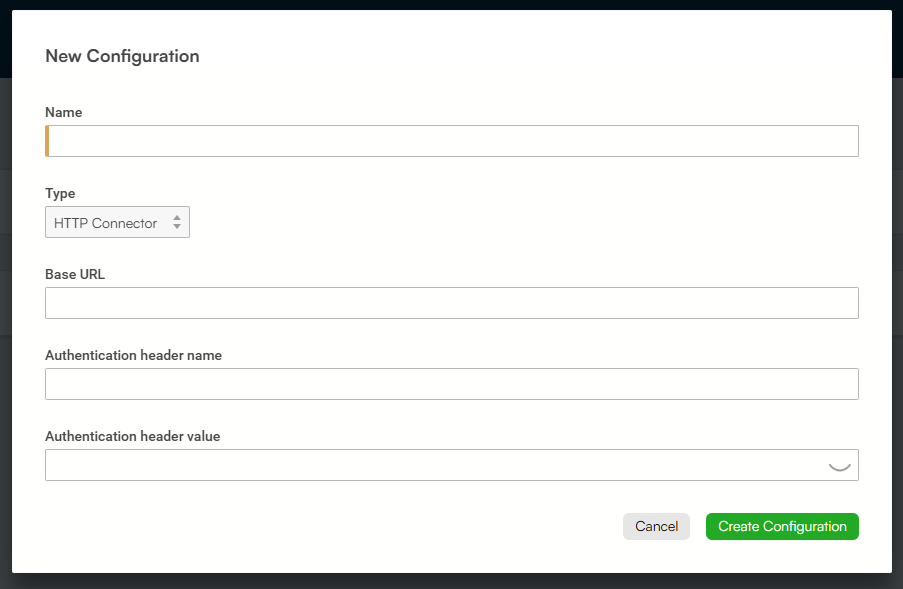
| Field | What to enter |
|---|---|
| Name | A name the client's staff will recognise, such as the name of the source system or venue. It's shown to staff throughout Spektrix, for example in error messages if the source system can't be reached. |
| Type | HTTP Connector. |
| Base URL | The absolute URL your connector serves the endpoints from, for example https://connector.example.com/v1. It must use HTTPS. Every endpoint path is appended to this URL. A trailing slash is optional. |
| Authentication header name | The header name you chose, for example X-Api-Key. |
| Authentication header value | The secret you issued for this Spektrix client. Spektrix stores it securely and never displays it. |
Give the Spektrix client the base URL, the header name and the header value. Send the header value through a secure channel.
② Agency API credentials: your connector to the source system
Your connector authenticates with the source system's agency API however that API requires, for example with an API key, OAuth client credentials or a signed request. Spektrix plays no part in this. It doesn't know what the credentials are or how they're used.
Store these credentials in your connector's own secure configuration, such as a key vault or secret store, and not in source code. If one connector serves several Spektrix clients, store a separate set of source system credentials for each client, and select the right set using the connector credential that arrived with the request.
If the source system rejects your connector's credentials, return an error status, such as 502 Bad Gateway, with a description in the response body. Don't return 401, which would suggest that Spektrix's credential is wrong. Spektrix shows staff that the source system couldn't be reached and logs your response. See Errors.