Payments Component
The Spektrix Payment component is powered by Adyen and is used across all payment integration approaches whenever a client is using Spektrix Payments to process Orders. This documentation applies to both when the component is embedded in an iframe checkout or rendered directly via the Payments API.
This page covers the shared setup and configuration that applies regardless of how you integrate the component. For iframe-specific setup (previewing, Permissions-Policy), see Spektrix Payments (Iframes). For API-driven payment flows, see Payments API.
The payment component may not appear for customers using an out of date web browser. To pay online, customers should ensure they have updated their web browser to the latest version.
Styling the payment component
The payment component comes with a default styling. The font used will be the same as the font you have selected on your existing CSS file.
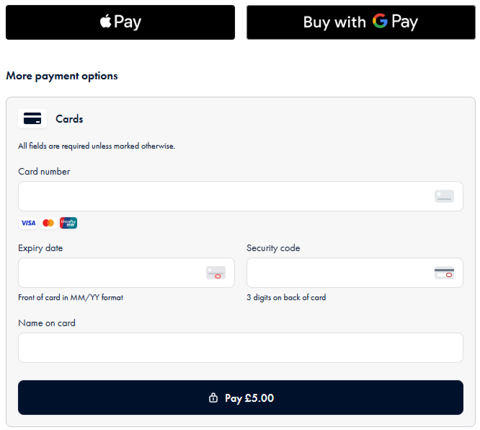
If you want to customise the styling you can use the CSS classes below. These can be styled using the existing CSS file that you use for the Spektrix iframes, or in your own stylesheets if integrating via the API.
These classes follow the BEM (.block__element--modifier) methodology, where state is represented by a modifier (such as --selected).
.adyen-checkout__payment-method {
    /* Payment method container */
}
.adyen-checkout__payment-method--selected {
    /* Payment method that has been selected */
}
.adyen-checkout__payment-method__header {
    /* Payment method icon and name */
}
.adyen-checkout__payment-method__radio {
    /* Radio button in payment method header */
}
.adyen-checkout__payment-method__radio--selected {
    /* Selected radio button in payment method header */
}
.adyen-checkout__payment-method__name {
    /* Payment method name in the payment method header */
}
.adyen-checkout__spinner__wrapper {
    /* Spinning icon */
}
.adyen-checkout__button {
    /* Buttons */
}
.adyen-checkout__button--pay {
    /* Pay button */
}
.adyen-checkout__field {
    /* Form field container */
}
.adyen-checkout__label {
    /* Form label container */
}
.adyen-checkout__label__text {
    /* Text element inside the form label container */
}
.adyen-checkout__input {
    /* Input fields */
}
.adyen-checkout__input--error {
    /* Error state for the input fields */
}
.adyen-checkout__error-text {
    /* Error message text */
}
.adyen-checkout__card__cardNumber__input {
    /* Input field for the card number */
}
.adyen-checkout__field--expiryDate {
    /* Input field for the expiry date */
}
.adyen-checkout__field__cvc {
    /* Input field for the CVC security code */
}
Culture
French localisation is available for the payment component.
- Iframe integrations: The culture is inherited by what is set in the checkout iframe by default. More on culture and iframes here.
- API integrations: Set the
languageattribute on the<spektrix-payments>web component (e.g.language="fr"). The default is English if omitted.
Apple Pay setup
To support Apple Pay you will need to host the Apple domain association file and configure your firewall. These steps apply regardless of whether you use iframes or the Payments API.
If you are embedding the payment component in an iframe, you must also add the allow="payment" attribute to your iframe tag. See Spektrix Payments (Iframes) for details.
Host the Apple domain association file
- Download and unzip the domain association file.
- Host the domain association file with the name apple-developer-merchantid-domain-association on each domain you want to use, including subdomains, under the following path:
/.well-known/apple-developer-merchantid-domain-associationThis should be on the root domain or subdomain of the page in which the payment component is hosted (or the page hosting the Spektrix iframe). The file should display in the browser rather than download. - The file must:
- Have Content-Type: text/plain in the header.
- Be externally accessible.
- Not be password protected.
- Not be behind a proxy or redirect.
- Be hosted with the Unix line ending.
- See an example of a working domain association file.
Configure your firewall
- Allow Apple IP Addresses for Domain Verification.
- Include out.adyen.com in your configuration to allow communication from our network.
Adyen does not provide a list of IP addresses for allow-listing, because over time the list may change for various reasons, for example, due to ISP configuration changes. If you are unable to configure your firewall with a domain allow-list, attempt to resolve Adyen IP addresses by performing a DNS lookup on out.adyen.com, and then add those IP addresses to your allow-list. Beware that you still run the risk of a disruption if the IP addresses change.
Domain whitelisting
Your hosting domain must be whitelisted (character limit: 77). Contact Spektrix to provide your domain(s).
- You must provide both production and development
custom-domainvalues andtop-level-domainvalues. - All domains must use the
httpsprotocol.